Invoices
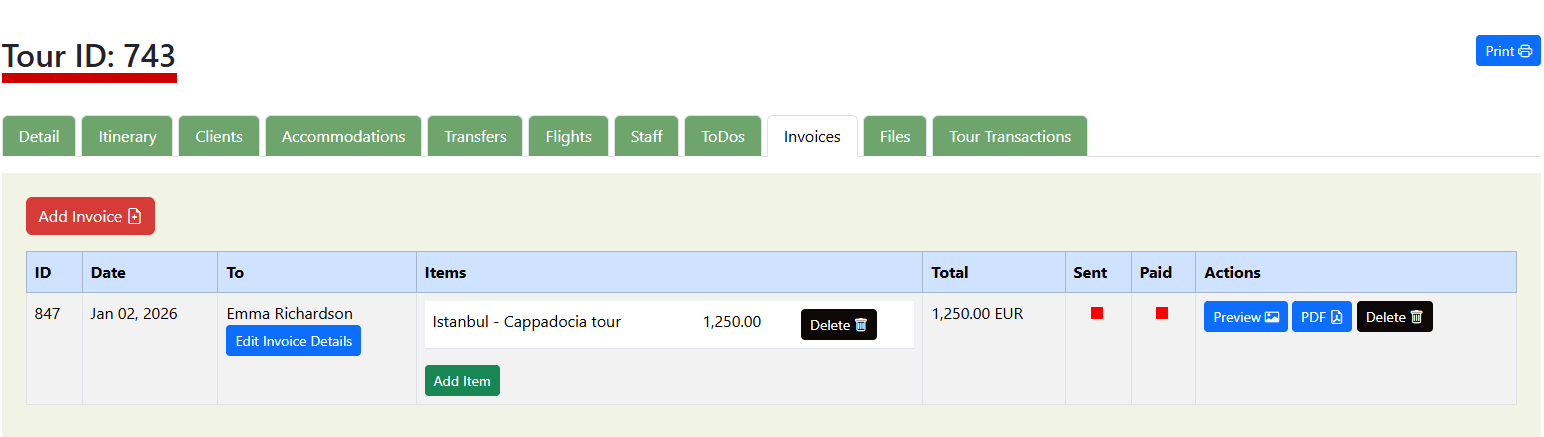
The Invoices section allows you to create, manage, send, and track invoices related to a specific tour. Each invoice is directly linked to the tour, ensuring accurate financial tracking and transparency.
| Column | Description |
|---|---|
| ID | Unique invoice number. Used for reference, tracking, and support |
| Date | Invoice creation date. |
| To | Invoice recipient (client or company). Edit Invoice Details button allows you to change recipient name, update billing details. |
| Items | Displays all invoice line items: Item description (e.g. Istanbul – Cappadocia tour) and item amount. Delete item button to remove individual items. Add Item button to add additional services or charges. Invoices automatically recalculate totals when items change. |
| Total | Displays the final invoice amount. Automatically calculated from invoice items. |
| Sent | Indicates whether the invoice has been sent to the client |
| Paid | Indicates payment status. |
| Actions | Available actions for each invoice: Preview – View the invoice before sending PDF – Download or send the invoice as a PDF Delete – Permanently remove the invoice |
Was this helpful?
Last updated January 2026